Market
Steam market
Selling & buying on the Steam Community Market, including buy orders.
Steam is the default marketplace and the only one where you can buy as well as sell. It works for any Steam item, not just CS2.
What an account needs
Three things, all visible on the account's Overview tab:
- An identity secret, since every listing needs a mobile confirmation
- Market access, shown as Community Market on the account page
- A wallet currency, which Steam sets the first time the account has a balance
Accounts missing any of these are skipped when you sell, and the modal tells you which.
Selling
Listings appear under Sell Listings with two numbers per row: what the buyer pays, and what you actually receive underneath it.
Sold listings pay into the account's Steam wallet, not to a SteamLabs balance.
Cancel unsold listings
To stop items sitting on the market forever, turn on Cancel listings that have not sold in Steam Market settings and pick how many days a listing may stay up. Once a listing has been up longer than that, SteamLabs cancels it and the item returns to the inventory.
The check runs every hour and creates a normal Cancel Market Listings task per account, so you can follow it on the Tasks page. Listings still waiting for a mobile confirmation are left alone, and so are accounts excluded from automatic sync.
Automatic sync
SteamLabs automatically refreshes your Steam listings and buy orders. The defaults are every 15 minutes while you have the dashboard open, every 4 hours while you are away, plus a daily discovery check.
Change the cadence and targeting from Steam Market settings:
- Known open activity syncs accounts that already have an open listing or buy order.
- Hybrid does the same and periodically checks every market-eligible account. This is the default and discovers activity you created directly on Steam.
- All eligible accounts syncs every market-eligible account at the online or offline cadence.
You can turn either the online or offline cadence off. At least one must stay on while automatic sync is enabled. Discovery is separate and only applies to Hybrid mode.
The same settings page can exclude individual accounts, tags, or account groups from scheduled syncs. These rules are combined, and tag or group membership is checked again each time a sync runs. Manual syncs still work for excluded accounts.
To sync only part of your fleet, turn on Only accounts with these tags or groups under Which accounts. An account qualifies through any tag or group you pick, and an exclusion still wins.
If automatic sync is off and an eligible account has not synced for 48 hours, the Steam Market page warns you. You can sync now, turn automatic sync back on, or dismiss the warning for 24 hours.
Buying
Buy orders sit under Buy Orders and are Steam only. A buy order says "buy up to this many of this item at this price or lower", and Steam fills it whenever a seller lists below your price.
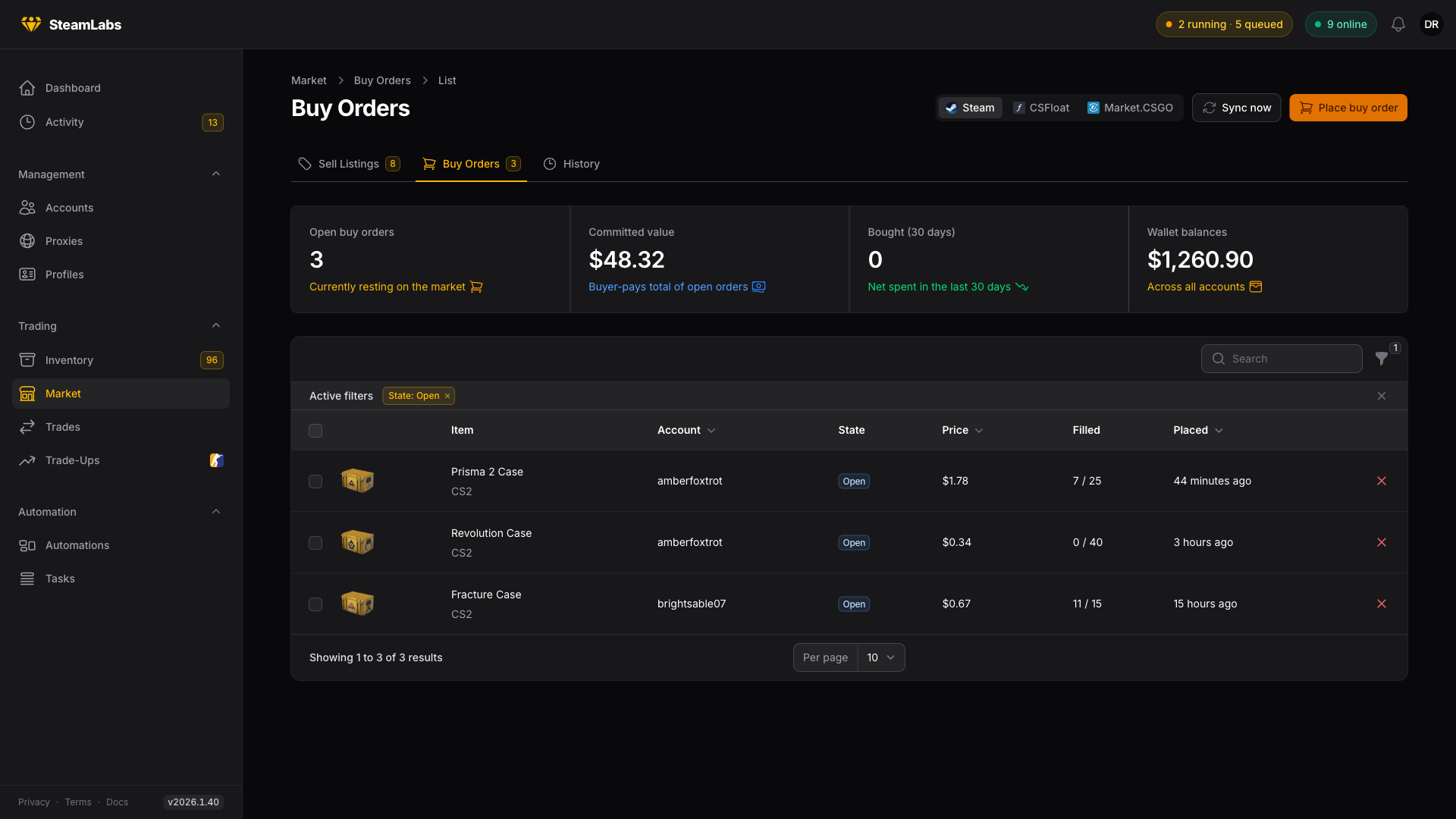
The Filled column shows progress, so 7 / 25 means seven bought and eighteen still wanted. Orders stay open until they fill completely, you cancel them, or the account runs out of wallet funds.
Buy as many as the wallet covers
Under How many to buy, pick As many as the wallet covers instead of a fixed quantity. Each account then bids on as many units as its own wallet can pay for, after what its other open buy orders already hold. The number is worked out from the live wallet when the order is placed, so you can set the price once for the whole fleet. Add At most to cap it.
This mode ignores Steam's 10x allowance, so every unit is paid for if the whole order fills. An account that cannot pay for one unit is skipped, and its task says why. The task page shows how many units each account bid on.
The same option is on the Place Buy Order step in automations.
Buy one specific listing
A buy order fills with whichever copy is cheapest. For a skin the copy matters: two listings at the same price can carry very different floats or patterns. To buy the copy you picked, create a Buy Market Listing task from the Tasks page.
Pick the one account that should buy it, then fill in the game, the item's exact market hash name, the Listing ID from the Steam market page, and Pay at most: the full price including Steam's fees, in that account's wallet currency.
When the task runs it reads the listing's live price, refuses if that is above your cap, and only then buys. The account never pays more than the cap. Steam asks for a mobile confirmation on market purchases, so the account needs an identity secret, market access, and a billing address, like a buy order.
The task page shows the result: Bought, with the price paid, the wallet balance after, and the asset ID the item got in the inventory. If nothing was bought, the task still completes and says why: the listing is gone, it costs more than your cap, the wallet was too low, or the listing was not among the cheapest listings the task checked. The bought item shows up in the inventory on the next refresh.
Cancel one position
You do not have to clear an account to drop one item. On Buy Orders, pick the item under the Items filter, select the rows, and choose Cancel selected. Each account gets one task that cancels only those orders. Currency, Price and Older than narrow the list the same way, and the same filters work on Sell Listings.
Items matches exact names, so the StatTrak™ version of an item only shows up when you pick it too.
For an automation, use the Cancel Buy Orders task and set Which buy orders to cancel to Only matching buy orders. Accounts with nothing matching are skipped, so no login is spent on them. Cancel Market Listings works the same way for listings.
History
History is your accounts' market history: every listing created, canceled and sold, with what the account actually received. The Sold (30 days) stat above the table reads from here.