Market
Market.CSGO
Listing, selling & delivering on Market.CSGO.
Market.CSGO is CS2 only and USD only. SteamLabs automates listing, pricing and delivery here too.
Connect the account first, see Connecting a marketplace.
Listing
List from Inventory with Market.CSGO selected. Pricing options are Undercut lowest ask, Percent of reference and Top bid (instant sale).
Top bid sells straight into the highest standing buy order instead of waiting for a buyer. It sells immediately, at a lower price than listing normally.
Change a price
Use Change price on a listing, or select several and use Change price of selected. Prices go to the tenth of a cent here, so you can type 0.409, and an undercut can be as small as 0.1 cents. The Listings table shows the exact price, for example $0.409.
Keep a listing competitive
Market.CSGO prices in tenths of a cent, so the undercut step goes down to 0.1 cents. This matters most on cheap inventory: a full cent under a 4 cent item is a 25% discount, where a tenth of a cent is 2.5%.
When you use Undercut lowest ask, you can turn on Keep this price competitive. SteamLabs periodically checks the live market.csgo order book and only lowers your listing after another seller falls below every copy of that item you have listed. A tie and your own lowest listing are left alone.
Each rule stores a fixed USD minimum when it is enabled. You can change, pause, or resume the rule from Listings, and change the venue defaults from Settings. Choosing a price manually pauses the rule so a later check does not replace your decision. The first listing you opt in turns the venue's scheduled checks on; the master switch under Settings pauses them all at once without losing any rules.
Background updates
SteamLabs keeps the account checked in while you have listings, deliveries to finish, or a listing task preparing a sale. Idle accounts stay offline and are checked about every 30 minutes. Accounts only waiting for settlement are checked about every 10 minutes.
Creating a listing brings the account online first. SteamLabs refreshes the venue inventory before listing and about every 10 minutes while selling. Opening a market page refreshes its visible accounts. Sync now requests a refresh without keeping idle accounts online.
Checks are spread out across accounts. Unchanged data does not refresh your dashboard repeatedly. Ordinary page updates from a burst are grouped within about two seconds. Sales, delivery problems, and settlement actions still run as soon as a check finds them.
Sales and delivery
Sales land under Sales, with a Delivery deadline column.
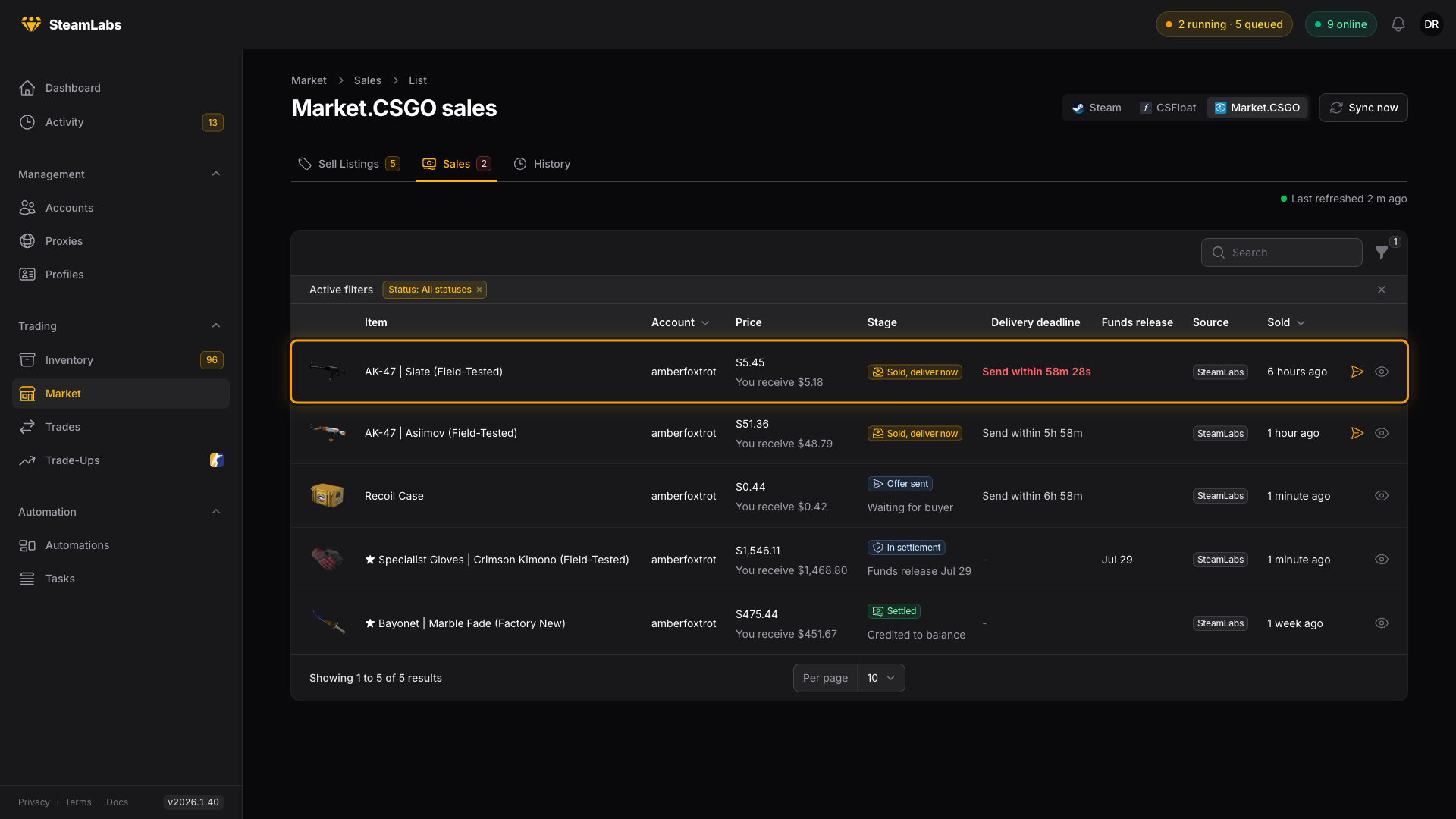
| Stage | What it means |
|---|---|
| Sold, deliver now | Sold, and the item has to be sent within 7 hours |
| Offer sent | The trade offer is out, waiting for the buyer to take it |
| In settlement | Delivered, waiting out the hold |
| Settled | Funds credited to your balance |
What SteamLabs does automatically
Sales of listings SteamLabs created are delivered automatically, the same as on CSFloat.
Sales from listings you made on Market.CSGO yourself only auto-deliver when Auto-deliver external sales is on for that account. Otherwise you get a notification and deliver by hand with Deliver now.
Getting paid
Market.CSGO takes 5%, so You receive is the sale price minus the fee. Funds sit in settlement for about a week before landing in your balance. The Market.CSGO balance stat shows what is available, with anything still settling noted underneath.