Market
Connecting a marketplace
Setting up CSFloat, Market.CSGO, Skin.Land, Skinport, and DMarket on an account.
CSFloat, Market.CSGO, Skin.Land, Skinport, and DMarket need to be connected per account before you can sell on them. Steam needs none of this.
CSFloat and Market.CSGO take one API key and a dedicated static proxy. DMarket takes a public and private Trading API key pair and the same kind of proxy. Skin.Land and Skinport issue no key: skip to Skin.Land or Skinport. Skinport still needs a dedicated static proxy, for a different reason than the key venues.
What you need
- An API key from the marketplace itself, created while logged in as this Steam account. DMarket shows a public key and a private key. The private key is shown once.
- A dedicated static proxy, meaning a static proxy used by this account and no other
These marketplaces expect one account to keep one IP. SteamLabs will not connect CSFloat, Market.CSGO, DMarket, or Skinport without a dedicated static proxy. A rotating proxy changes IP per request and gets the account rate limited. Skinport has the same pin for the new-device email gate.
Connecting
Open the account, go to the Marketplaces tab, and fill in the card for the marketplace you want. Paste the API key (both keys on DMarket), pick the proxy, and connect. SteamLabs queues a verification task that checks the key against the marketplace and pulls back your balance and fee. Selling stays off until that verification succeeds.
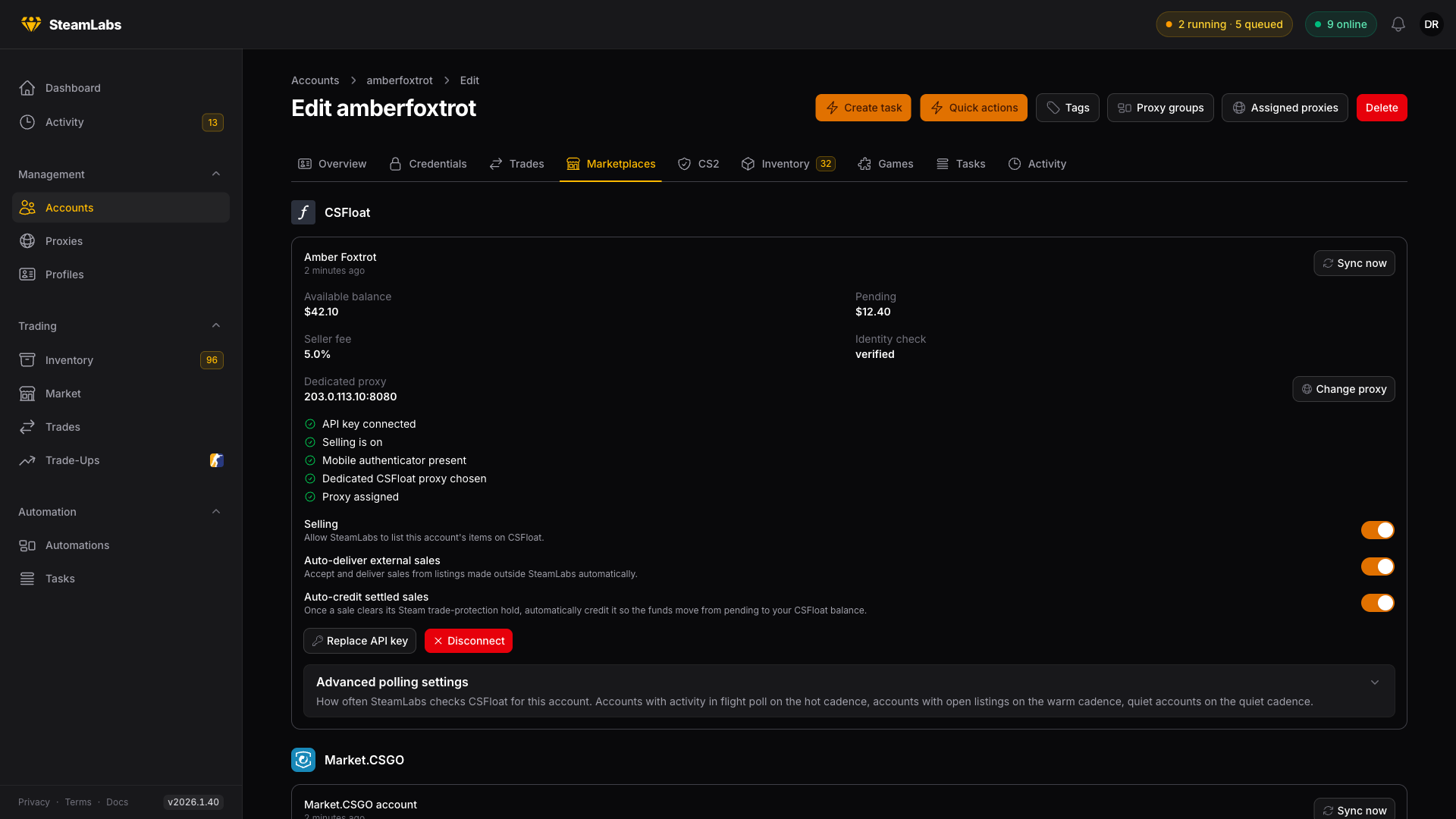
The readiness checklist
Once connected, the card shows a checklist. All five have to be green before the account will list anything:
- API key connected
- Selling is on
- Mobile authenticator present
- Dedicated CSFloat proxy chosen (or the Market.CSGO equivalent)
- Proxy assigned
A red row tells you what to fix. The mobile authenticator row is the one people miss: delivering a sale means sending a Steam trade, and that needs the account's identity secret.
The three toggles
- Selling lets SteamLabs list this account's items. Turn it off to pause an account without disconnecting it.
- Auto-deliver external sales covers listings you made on the marketplace yourself, outside SteamLabs. See CSFloat for what this changes.
- Auto-credit settled sales moves funds from pending to your balance once a sale clears its hold, instead of waiting for you.
Replacing a key
Replace API key swaps the key in place and re-verifies. Disconnect removes the connection but leaves your listings alone on the marketplace, so delist first if that is what you meant.
Skin.Land
Skin.Land issues no API key. SteamLabs signs in to Skin.Land as that Steam account, the same way the website does. Your Steam password and authenticator are never shared with Skin.Land. A dedicated proxy is optional, not a precondition.
Open the account, go to the Marketplaces tab, and press Connect on the Skin.Land card. SteamLabs queues a sign-in. The card reports connected once that finishes.
The readiness checklist is four rows, not five:
- Connected to Skin.Land
- Selling is on
- Mobile authenticator is set
- A proxy is assigned
The authenticator row is load-bearing: Skin.Land's bot sends you the trade offer, and accepting it needs a mobile confirmation.
Selling works the same as on the other venues. Skin.Land has no auto-deliver or auto-credit toggles: SteamLabs already accepts the offer inside the sale, and settlement resolves on a clock.
Reconnect signs in again. Disconnect drops the session and stops selling. Recorded sales stay. See Skin.Land for selling and payout.
DMarket
DMarket's card takes the public key, the private key, and a dedicated static proxy. SteamLabs stores the private key encrypted and never shows it again.
The Steam id on the DMarket account must match this Steam account. A mismatch shows as a wrong-account connection. Generate a new key pair on DMarket while logged in as this account, then reconnect.
The readiness checklist is six rows, not five:
- Public key connected
- Private key connected
- Selling is on
- Mobile authenticator present
- Dedicated DMarket proxy chosen
- Proxy assigned
See DMarket for listing, instant sell, and withdraw.
Skinport
Skinport issues no API key. SteamLabs signs in to Skinport as that Steam account, the same way the website does. Your Steam password and authenticator are never shared with Skinport.
Skinport treats a first Steam login from a new IP as a new device and emails a confirm link. That link only finishes the sign-in when it is opened from the same IP, so a dedicated static proxy is required. A rotating or shared Steam egress keeps looking like a new device.
Open the account, go to the Marketplaces tab, pick the proxy on the Skinport card, and press Connect. SteamLabs queues a sign-in through that proxy. The card reports connected once that finishes.
If Skinport emails a new device confirm, do not open the link in your own browser. That logs that browser in and leaves the SteamLabs session unfinished. Copy the confirm-device-email link from the mail, paste it on the card, and press Confirm device. SteamLabs opens it through the same dedicated proxy that started the login. Reconnect starts a fresh sign-in if you need one. Nothing is left spinning while you wait for the mail.
The readiness checklist is five rows:
- Connected to Skinport
- Selling is on
- Mobile authenticator is set
- Dedicated Skinport proxy chosen
- A proxy is assigned
The authenticator row is load-bearing: a Skinport bot sends you the trade offer, and accepting it needs a mobile confirmation.
Selling works the same as on the other listing venues. Skinport has no auto-deliver toggle: after the deposit you are out of the Steam loop.
Reconnect signs in again. Disconnect drops the session and stops selling. Recorded listings stay. See Skinport for selling and payout.