Market
CSFloat
Listing, selling & delivering on CSFloat.
CSFloat is CS2 only. SteamLabs can automate the whole thing for you: listing, pricing, and delivering every sale to the buyer.
Connect the account first, see Connecting a marketplace.
Listing
List from Inventory exactly as described in Overview, picking CSFloat in the modal. Pricing options are Undercut lowest and Percent of reference, both worked out per item when the listing is actually created.
Your listings show up under Listings, tagged SteamLabs if SteamLabs made them or Imported if you made them on CSFloat yourself. Both kinds are managed here.
Keep a listing competitive
When you use Undercut lowest, you can turn on Keep this price competitive. SteamLabs periodically checks the live CSFloat market and only lowers your listing after another seller falls below every copy of that item you have listed. A tie and your own lowest listing are left alone.
Each rule stores a fixed USD minimum when it is enabled. You can change, pause, or resume the rule from Listings, and change the venue defaults from Settings. Choosing a price manually pauses the rule so a later check does not replace your decision. The first listing you opt in turns the venue's scheduled checks on; the master switch under Settings pauses them all at once without losing any rules.
Background updates
Idle accounts are checked about every 15 minutes. Accounts with listings or unsettled sales get a full check about every two minutes. While preparing a sale or handling delivery, SteamLabs also checks for trade changes about every 30 seconds.
Opening a market page refreshes its visible accounts. Sync now requests a full refresh without putting all idle accounts on the fastest schedule. Marketplace rate limits can delay a check.
Checks are spread out across accounts. Unchanged data does not refresh your dashboard repeatedly. Ordinary page updates from a burst are grouped within about two seconds. Sales, delivery problems, and settlement actions still run as soon as a check finds them.
Sales and delivery
When something sells it moves to Sales.
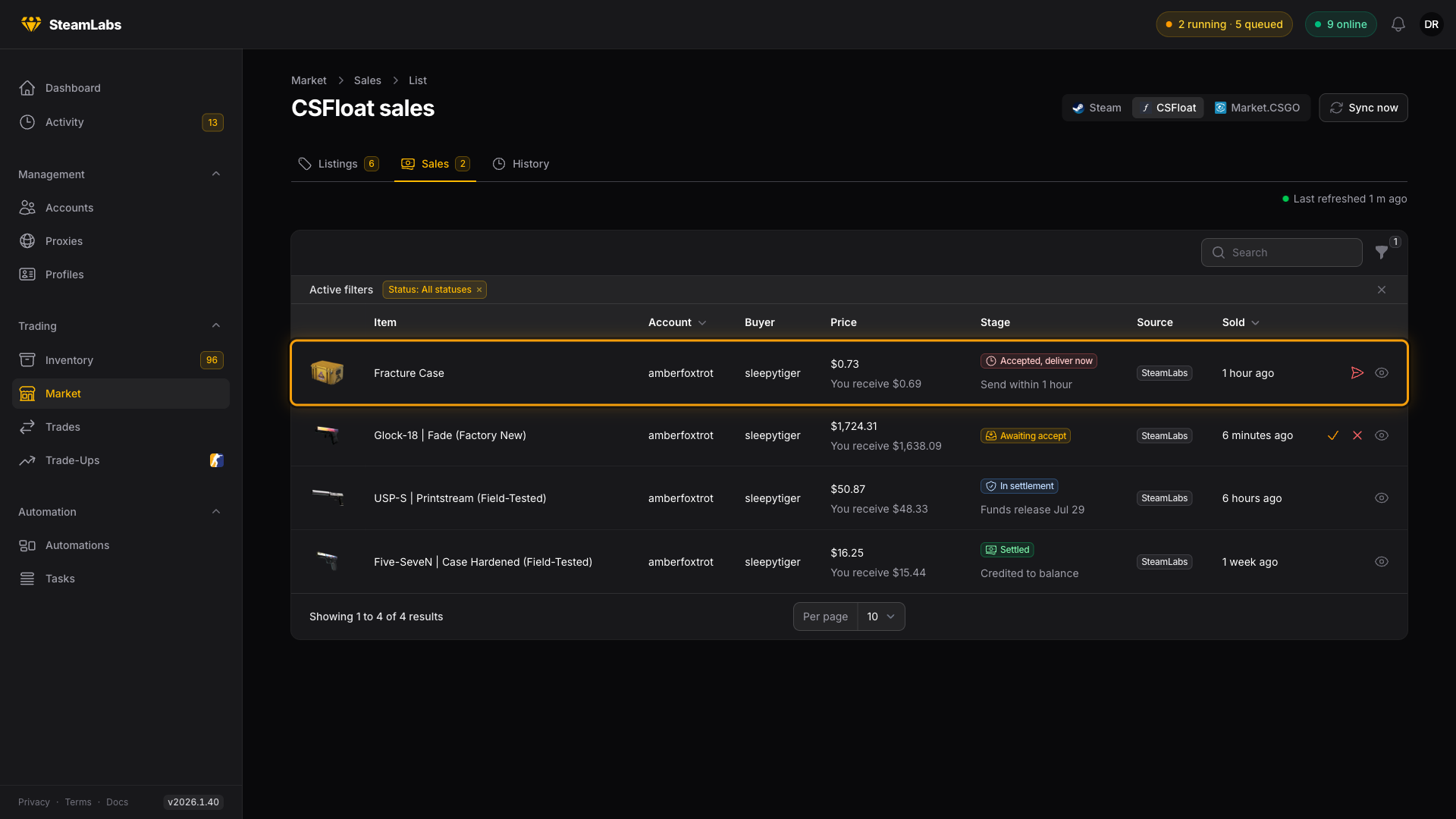
A sale moves through four stages:
| Stage | What it means |
|---|---|
| Awaiting accept | The buyer has paid, the sale needs accepting |
| Accepted, deliver now | Accepted, and the item has to reach the buyer within the deadline shown |
| In settlement | Delivered, waiting out Steam's trade-protection hold |
| Settled | Funds credited to your CSFloat balance |
What SteamLabs does automatically
Sales of listings SteamLabs created are accepted and delivered automatically. You do not need to do anything, and the countdown you see is the deadline the worker is working against, not a task for you.
Sales of listings you made on CSFloat yourself only auto-deliver when Auto-deliver external sales is on for that account. With it off, SteamLabs notifies you and the sale waits for you to press Accept and deliver.
Either way the manual buttons are there when you need them: Accept and deliver, Deliver now and, if something went wrong, Retry delivery. Tick several rows and the bulk menu offers Deliver selected and Cancel selected, which run one delivery per account.
Getting paid
CSFloat takes a 5% seller fee, so the You receive figure is what lands in your balance. Money shows as Pending until the sale settles, then moves to Available balance. Both are on the account's Marketplaces card and in the stat row above the listings table.